









Phishing isn’t slowing down. It’s speeding up.
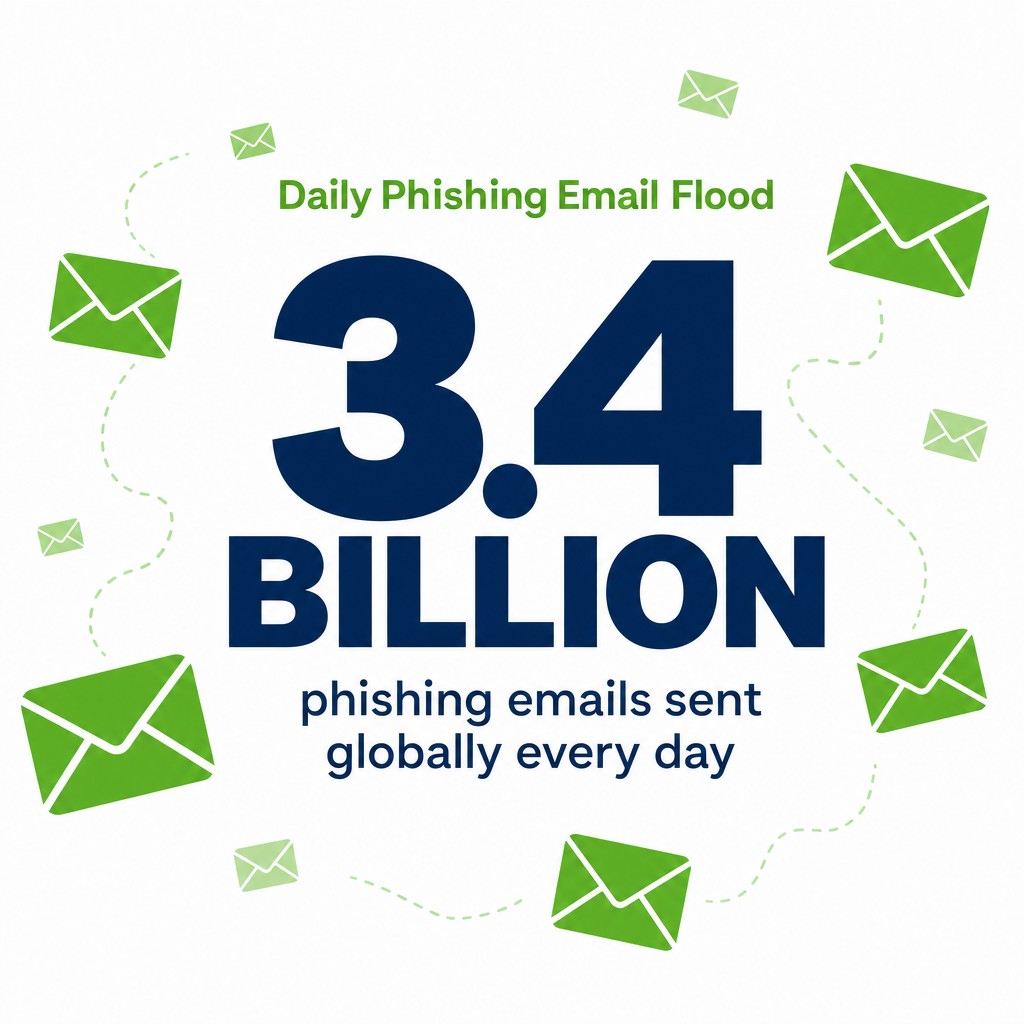
Over 90% of cyberattacks begin with phishing attempts, and criminals are sending 3.4 billion phishing emails globally every day. That’s not a typo. Billions.
Most SME leaders think their team would spot a dodgy email. They’re wrong.
Modern phishing attacks don’t look like the broken-English scams from 2005. They’re polished, targeted, and terrifyingly effective. Your finance director gets an email from “the CEO” requesting an urgent wire transfer. Your HR manager clicks a link in what looks like a legitimate Microsoft security alert. Your receptionist answers a call from “IT support” asking for their password.
All real. All common. All successful.
What follows are 15 real-world phishing examples I’ve seen damage businesses. Not theoretical risks. Actual tactics cybercriminals used to steal credentials, compromise systems, and drain bank accounts. Each example includes the warning signs your team should spot and practical steps to stop these attacks before they succeed.
If your people can’t recognise these patterns, you’re already exposed.
1. Email Phishing: The Foundation Attack
Email phishing is the original scam, and it’s still the most common.
A cybercriminal sends a fraudulent email pretending to be a legitimate organisation. The goal is simple: trick the victim into clicking a malicious link, downloading an infected attachment, or revealing sensitive information like passwords or credit card details.
How the Attack Works
The scammer crafts an email that looks like it came from a trusted source. Common impersonations include banks, delivery companies, IT departments, or business partners. The message creates urgency: “Your account will be suspended,” “Verify your identity immediately,” or “Confirm this payment now.”
The email contains either a link to a fake website designed to steal credentials or an attachment infected with malware. Once the victim clicks or downloads, the cybercriminal gains access to systems or data.
Real-World Example
A finance team receives an email appearing to come from their bank’s fraud department. The subject line reads “Suspicious Activity Detected on Account.” The email uses the bank’s logo, colour scheme, and professional formatting.
The message states: “We’ve detected unusual activity on your business account. Click here to review and confirm legitimate transactions within 24 hours, or your account will be temporarily frozen.”
The link leads to a spoofed website that looks identical to the bank’s login page. When the finance manager enters their credentials, the scammer captures them immediately. Within hours, unauthorised transfers drain the account.
Warning Signs Your Team Should Spot
- Generic greetings like “Dear Customer” instead of your name
- Urgent language threatening account closure or legal action
- Email addresses that look similar but aren’t exact ([email protected] instead of amazon.com)
- Unexpected attachments or download requests
- Links that don’t match the supposed sender when you hover over them
What to Do Right Now
Train your team to verify sender addresses carefully. The display name might say “HSBC Bank,” but the actual email address could be random letters at a free email provider.
Implement a strict policy: Never click links in unexpected emails. Instead, go directly to the company’s website by typing the URL yourself or using a saved bookmark.
Set up email authentication protocols (SPF, DKIM, DMARC) to reduce spoofed emails reaching your inbox. These technical controls filter many phishing attempts before your team sees them.
2. Spear Phishing: The Personalised Strike
Spear phishing takes email scams to a targeted level.
Unlike mass email phishing that casts a wide net, spear phishing attacks focus on specific individuals within your organisation. The cybercriminal researches their victim, learning their role, relationships, and business activities to craft convincing, personalised messages.
How the Attack Works
The scammer identifies a valuable target, often someone with financial authority or access to sensitive data. They gather information from LinkedIn, company websites, social media, and public records.
Armed with this intelligence, they create an email referencing real projects, colleagues, or business relationships. The message feels legitimate because it contains accurate context that a random scammer wouldn’t know.
The email might reference a current client, mention a recent company event, or use internal jargon. This personalisation dramatically increases the click rate.
Real-World Example
A project manager at a law firm receives an email from what appears to be a senior partner. The subject line reads “Urgent: Client Matter – Confidential.”
The email states: “I’m in a meeting with the board and need you to review this settlement agreement for the Morrison case immediately. Please download the attached document and confirm the terms by end of day.”
The scammer knows the senior partner’s name, the project manager’s role, and references an actual ongoing case. The attachment is a malicious document that installs malware when opened, giving the cybercriminal access to the firm’s entire client database.
Warning Signs Your Team Should Spot
- Unusual requests from colleagues, even if they seem to know internal details
- Pressure to act quickly on financial or sensitive matters
- Requests that bypass normal approval processes
- Slight variations in email addresses (john.smith@ vs johnsmith@ or john-smith@)
- Requests sent at odd hours when verification would be difficult
What to Do Right Now
Establish verification protocols for sensitive requests. If your CEO emails asking for an urgent transfer, call them using a known number before acting.
Limit the personal information your team shares publicly on LinkedIn and social media. Every detail helps scammers build convincing spear phishing attacks.
Create internal procedures that require dual approval for financial transactions or data access, regardless of who requests it. This adds a verification layer that catches many spear phishing attempts.
3. Whaling: Hunting the Big Targets
Whaling attacks go after executives and senior leaders.
These are spear phishing attacks aimed at the highest-value targets in your organisation: CEOs, finance directors, and board members. The stakes are higher because these individuals have authority to approve large transfers, access confidential data, and make decisions without oversight.
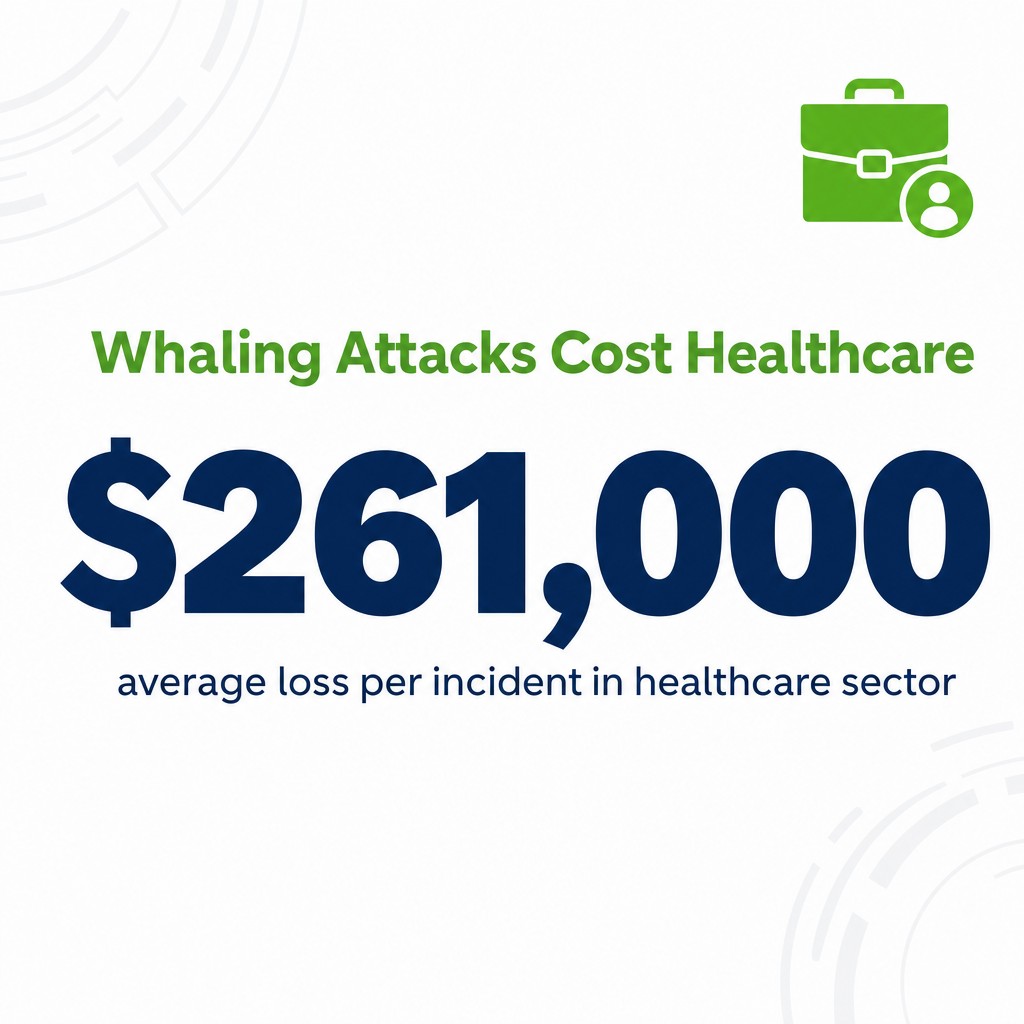
Whaling attacks targeting executives have resulted in an average loss of $261,000 per incident in the healthcare sector, and that’s just one industry.
How the Attack Works
The cybercriminal identifies senior executives and studies their communication patterns, business relationships, and areas of responsibility. They craft highly sophisticated emails that appear to come from board members, legal counsel, regulatory bodies, or major clients.
The message typically involves confidential legal matters, regulatory compliance issues, or significant business opportunities. The language and tone match executive-level communication, and the request seems entirely within the target’s authority.
Real-World Example
A CFO receives an email appearing to come from the company’s external legal counsel. The subject line reads “Confidential: Pending Acquisition – Legal Review Required.”
The email states: “As discussed with the board, we need your immediate review of the attached merger agreement. Given the confidential nature and tight timeline, please review and confirm your approval by close of business. Do not discuss with other staff until the deal is finalised.”
The attachment contains malware disguised as a PDF. The request for confidentiality prevents the CFO from verifying with colleagues, and the urgency pushes them to act without proper checks.
Warning Signs Your Team Should Spot
- Requests for confidentiality that prevent normal verification
- Legal or regulatory language designed to intimidate
- Unusual file formats or unexpected attachments from known contacts
- Requests that seem legitimate but arrive through unexpected channels
- Pressure to act alone without consulting the usual team
What to Do Right Now
Your senior team needs specific training on whaling tactics. Many executives assume they’re too experienced to fall for scams. They’re often the most vulnerable because scammers target their authority.
Implement executive approval protocols that can’t be bypassed by email alone. Even the CEO should have verification steps for high-value transactions.
Use security awareness training that includes role-specific scenarios. Your finance director faces different risks than your sales team.

4. Business Email Compromise (BEC): The CEO Fraud
Business email compromise attacks impersonate executives to authorise fraudulent payments.
The scammer either hacks a real executive email account or creates a convincing fake one. They then email the finance team requesting urgent wire transfers, often claiming to be travelling or in a meeting and unable to follow normal procedures.
How the Attack Works
The cybercriminal identifies the organisational structure and payment approval processes. They learn who has authority to transfer funds and who processes those requests.
The attack typically happens in two stages. First, they compromise an executive’s email through phishing or credential theft. Second, they monitor email traffic to understand communication patterns and identify opportune moments to strike.
The fraudulent request appears to come from a legitimate email address, uses the executive’s writing style, and references real business activities. The finance team sees an email from their CEO’s actual address requesting a time-sensitive payment.
Real-World Example
A finance officer receives an email from the CEO’s email address on Friday afternoon. The subject line reads “Urgent Payment – Acquisition Closing Today.”
The email states: “I’m in final negotiations for the acquisition we discussed last month. The seller’s legal team requires immediate payment of £450,000 to this account to close the deal before markets open Monday. I’m tied up in meetings, so process this directly and we’ll handle the paperwork next week.”
The email includes wire transfer details and emphasises confidentiality. The finance officer, knowing the CEO has been working on acquisitions, processes the transfer. The money disappears into an untraceable account.
Warning Signs Your Team Should Spot
- Requests that bypass established approval workflows
- Unusual payment destinations, especially international accounts
- Time pressure that prevents normal verification
- Instructions to keep the transaction confidential from other team members
- Requests sent at unusual times when verification is difficult
What to Do Right Now
Create a payment verification protocol that requires voice confirmation for transfers above a certain threshold. An email alone should never authorise significant payments, even from the CEO.
Establish a callback procedure using known phone numbers, not contact details provided in the suspicious email. The scammer can’t fake a voice call to a verified number.
Train your finance team that executives won’t be offended by verification requests. Any leader who gets angry about security checks is either compromised or not worth working for.
5. Smishing: Phishing Through Text Messages
Smishing brings phishing attacks to your mobile phone.
The term combines “SMS” and “phishing.” Cybercriminals send fraudulent text messages designed to trick victims into clicking malicious links, revealing personal information, or downloading infected apps.
Mobile users are often less cautious than when checking email on a computer, making smishing particularly effective.
How the Attack Works
The scammer sends text messages impersonating delivery companies, banks, government agencies, or your employer’s IT department. The message creates urgency: a package needs redelivery, your account has suspicious activity, or your company credentials need immediate verification.
The text includes a link to a fake website that looks legitimate on mobile devices. Small screens make it harder to verify URLs, and users often click without the same scrutiny they’d apply to emails.
Real-World Example
Employees receive a text message claiming to be from Royal Mail: “Your parcel is awaiting delivery. Confirm your address and pay £2.99 redelivery fee: [link]”
The link leads to a convincing fake website requesting credit card details for the small fee. Once entered, the cybercriminal captures the full card information and uses it for fraudulent purchases.
Another variant: “Your company VPN access expires today. Verify your credentials here [link] to maintain remote access.” The link captures work login credentials, giving scammers access to company systems.
Warning Signs Your Team Should Spot
- Unexpected delivery notifications when you haven’t ordered anything
- Urgent account verification requests via text instead of official apps
- Shortened URLs that hide the real destination
- Requests for payment or personal information through text links
- Generic messages that don’t include specific account or order details
What to Do Right Now
Tell your team to never click links in unexpected text messages. If Royal Mail texts about a delivery, open the Royal Mail app or website directly to check.
Make your IT policy clear: You will never request password verification through text message links. Any such message is automatically a scam.
Enable multi-factor authentication on all work accounts. Even if scammers steal credentials through smishing, they can’t access systems without the second authentication factor.
6. Vishing: Voice Call Phishing
Vishing uses phone calls to manipulate victims into revealing sensitive information.
Vishing incidents surged 442% in the second half of 2024 compared to the first half, making it one of the fastest-growing phishing methods.

The cybercriminal calls pretending to be technical support, your bank’s fraud department, or government officials. They use social engineering to create panic and pressure victims into immediate action.
How the Attack Works
The scammer uses spoofing technology to make their phone number appear legitimate. Your caller ID might show your bank’s real customer service number, your IT department’s internal extension, or a government agency.
They create urgency through fear. Your computer has been hacked and they’re calling to fix it. Fraudulent charges appeared on your account and you need to verify your details. Your tax records show irregularities and you face legal action unless you pay immediately.
The vishing attack often combines with other tactics. After the call, they send a “follow-up email” with malicious links or request remote access to your computer.
Real-World Example
An employee receives a call from someone claiming to be from the company’s IT helpdesk. The caller ID shows the IT department’s actual number.
The caller states: “We’ve detected unusual activity on your account and need to verify your credentials to prevent a security breach. Can you confirm your username and current password so we can secure your account?”
The employee, wanting to be helpful and seeing a legitimate number on caller ID, provides their login credentials. The scammer immediately accesses company systems using those credentials.
Warning Signs Your Team Should Spot
- Unexpected calls requesting passwords or sensitive information
- Pressure to act immediately without time to verify
- Threats of account closure, legal action, or security breaches
- Requests for remote access to your computer
- Callers who become aggressive when questioned
What to Do Right Now
Establish a simple rule: Legitimate organisations never call asking for passwords. Not your bank, not IT support, not government agencies. If someone calls requesting credentials, it’s a scam.
Train your team to hang up and call back using verified numbers from official sources. Don’t use contact details the caller provides.
Report vishing attempts to your IT team immediately. If scammers are targeting your organisation, others will likely receive similar calls.
7. Clone Phishing: The Trusted Duplicate
Clone phishing creates fraudulent copies of legitimate emails.
The cybercriminal intercepts or accesses a real email from a trusted source, creates an identical copy, but replaces legitimate links or attachments with malicious ones. They then resend this cloned email from a spoofed address.
How the Attack Works
The scammer obtains a legitimate email, often by compromising one party in a conversation or intercepting unencrypted email traffic. They duplicate the email’s content, design, and sender details exactly.
The malicious version contains slightly modified links or attachments. The email might claim to be a resend due to technical issues or an updated version of a previous document.
Because the victim recognises the email content and expects the communication, they’re more likely to click without scrutiny.
Real-World Example
A client sends your team a project proposal via email. Days later, you receive what appears to be the same email with the subject line “RE: Updated Project Proposal – Please Use This Version.”
The email looks identical to the original, uses the client’s branding, and references your ongoing conversation. The message states: “Apologies, there was an error in the pricing on the previous version. Please discard that and use the attached updated proposal.”
The attachment name matches the original document but contains malware. Because you were expecting this communication and the email appears legitimate, you open it without additional verification.
Warning Signs Your Team Should Spot
- Duplicate emails claiming technical errors or updates
- Slight differences in sender email addresses from previous messages
- Unexpected requests to re-download previously received files
- Links that look similar but have subtle URL differences
- Follow-up emails arriving outside normal business hours
What to Do Right Now
When receiving “updated” or “corrected” versions of documents, verify directly with the sender through a separate communication channel before opening.
Check sender email addresses carefully, even for messages that look familiar. Compare against previous emails from that contact.
Implement email encryption for sensitive communications. This makes interception and cloning significantly harder for cybercriminals.
8. Pharming: Redirecting to Fake Websites
Pharming redirects legitimate web traffic to fraudulent websites without the victim’s knowledge.
Pharming and DNS cache poisoning attacks redirect traffic to fraudulent sites by compromising the internet’s address book system.
Unlike phishing that requires victims to click malicious links, pharming manipulates the technical infrastructure. You type the correct website address, but malware or compromised servers send you to a fake site instead.
How the Attack Works
The cybercriminal either infects your computer with malware that modifies local DNS settings or compromises the DNS servers that translate website names to IP addresses. When you type a legitimate website address, the corrupted system redirects you to a fake site controlled by the scammer.
The fraudulent website looks identical to the real one. You enter your credentials, believing you’re on the legitimate site, and the cybercriminal captures everything you type.
Real-World Example
An employee types their bank’s URL directly into the browser, following security best practices by not clicking email links. Despite entering the correct address, DNS poisoning redirects them to a fake banking site that looks identical to the real one.
The employee enters their login credentials and approves a transaction. Everything appears normal, but they’re interacting with a fraudulent site. The scammer now has their banking credentials and details of their accounts.
Warning Signs Your Team Should Spot
- Website certificates showing security warnings
- Familiar websites suddenly looking slightly different
- HTTPS indicators missing from sites that normally have them
- Unexpected login prompts on sites where you should already be logged in
- Poor performance or unusual behaviour from familiar websites
What to Do Right Now
Check for HTTPS and valid security certificates before entering sensitive information. Modern browsers show clear warnings when certificates are invalid or missing.
Keep all systems and software updated. Many pharming attacks exploit known vulnerabilities that patches have already fixed.
Use reputable DNS services and consider implementing DNS security extensions (DNSSEC) that verify DNS responses haven’t been tampered with.
9. CAPTCHA-Gated Phishing: Hiding Behind Verification
CAPTCHA-gated phishing uses fake verification screens to evade security systems and appear legitimate.
CAPTCHA-gated phishing has become the largest proportion of phishing attachments at 31%, surging in 2024 and 2025.

The cybercriminal places a fake CAPTCHA screen between the victim and the malicious payload. This technique bypasses automated security scanners that can’t complete CAPTCHA challenges.
How the Attack Works
The phishing email contains a link or attachment that leads to what appears to be a legitimate CAPTCHA verification page. Users are conditioned to complete these challenges on legitimate sites, so they don’t raise immediate suspicion.
After completing the fake CAPTCHA, the victim is directed to a credential theft page, prompted to download malware, or unknowingly authorises malicious actions. The CAPTCHA layer delays security analysis and makes the attack appear more legitimate.
Real-World Example
A team member receives an email claiming to be from Microsoft about a security update. The email looks professional and uses correct branding.
Clicking the link leads to a page stating: “Verify you are human to access the security update.” The page displays a standard-looking CAPTCHA challenge asking users to identify traffic lights or crosswalks.
After completing the CAPTCHA, the user is prompted to download what appears to be a Microsoft security patch. The downloaded file installs malware that steals credentials and monitors system activity.
Warning Signs Your Team Should Spot
- CAPTCHA screens appearing on unexpected downloads or updates
- Verification challenges on websites that don’t normally use them
- CAPTCHA requests before accessing email attachments or links
- Unusual CAPTCHA designs or text that doesn’t match standard formats
- Multiple verification steps before reaching content
What to Do Right Now
Train your team that legitimate security updates come through official channels, not email links requiring CAPTCHA verification.
Implement endpoint protection that analyses downloaded files regardless of how they arrived. Even if a CAPTCHA bypasses email filters, endpoint security should catch malicious files.
When in doubt, navigate directly to the official website or software update mechanism rather than following email links, even if they include CAPTCHA verification.
10. QR Code Phishing (Quishing): Mobile Credential Theft
QR code phishing, or quishing, uses scannable codes to direct victims to malicious websites.
The cybercriminal embeds a malicious link in a QR code placed in emails, posters, or even legitimate-looking notices. Because QR codes hide the destination URL, users can’t verify where they’re being directed before scanning.
How the Attack Works
The scammer creates a QR code that links to a fake login page, malware download, or credential theft site. They distribute this code through phishing emails claiming to offer parking validation, event registration, payment processing, or security verification.
When scanned with a mobile device, the code opens a browser tab to the malicious site. Mobile users are particularly vulnerable because small screens make verification difficult and security awareness is typically lower on phones than computers.
Real-World Example
Office workers receive an email claiming to be from building management: “Update your parking permit by scanning this QR code. Failure to update by Friday will result in access revocation.”
The QR code leads to a fake parking management portal that looks legitimate. The page requests users to log in with their work email credentials “to verify employment status for parking eligibility.”
Employees scan the code, enter their work credentials, and unknowingly give scammers access to email accounts and connected systems.
Warning Signs Your Team Should Spot
- Unexpected QR codes in emails requesting urgent action
- QR codes replacing normal links in routine communications
- Requests to scan codes to verify identity or access
- QR codes on physical notices in unusual locations
- Parking, delivery, or service notifications using only QR codes
What to Do Right Now
Tell your team to treat QR codes with the same caution as suspicious links. Just because you can’t see the URL doesn’t make it safer.
Use QR scanning apps that preview the destination URL before opening it. Many modern smartphones offer this feature in camera settings.
Verify unexpected QR code requests through official channels. If building management wants you to update parking details, confirm through their known contact methods first.
11. Supply Chain Phishing: Exploiting Trusted Partners
Supply chain phishing attacks compromise trusted third-party vendors to reach your organisation.
Supply chain phishing attacks, like the Kaseya incident, have impacted hundreds of customer environments by targeting managed service providers and software vendors.
The cybercriminal doesn’t attack you directly. They compromise a supplier, partner, or service provider you trust, then use that relationship to deliver malicious content that bypasses your defences.
How the Attack Works
The scammer identifies vendors with access to multiple client organisations. They compromise the vendor through phishing, credential theft, or software vulnerabilities. Once inside, they use the vendor’s legitimate systems to distribute malware or phishing emails to all customers.
These attacks are particularly dangerous because the malicious content comes from trusted sources your security systems whitelist. Your team expects emails from these vendors and is trained to respond to their communications.
Real-World Example
Your IT service provider’s email system is compromised. The cybercriminal sends emails from the provider’s legitimate address to all their clients, including your business.
The email states: “Important: Critical security update required for all clients. Install this patch immediately to protect against emerging threats. Download and run the attached installer.”
Because the email comes from your trusted IT provider’s actual address and references legitimate security concerns, your team installs the “update.” The file is actually ransomware that encrypts your entire network.
Warning Signs Your Team Should Spot
- Unexpected software updates from vendors outside normal schedules
- Urgent requests from partners that bypass usual communication channels
- Generic communications from vendors who normally personalise messages
- Unusual file types or attachment names from trusted sources
- Requests that differ from established vendor procedures
What to Do Right Now
Establish verification procedures even for trusted vendors. Call your account manager using known contact details before installing urgent updates or following unusual requests.
Limit vendor access to only what they absolutely need. If a supplier is compromised, restricted access limits the damage.
Monitor vendor security practices through your procurement and compliance teams. Your security is only as strong as your weakest supplier.
12. Polymorphic Phishing: The Shape-Shifter
Polymorphic phishing constantly changes email content to evade security filters.
Polymorphic phishing attacks accounted for 76.4% of phishing emails in 2024, making them the dominant phishing technique.
The cybercriminal uses automation to generate countless variations of the same basic phishing email. Each version has slightly different wording, images, sender addresses, and attachment names. Security systems that flag specific patterns miss these constantly morphing attacks.
How the Attack Works
The scammer deploys automated tools that generate unique versions of phishing emails. One recipient gets an “invoice overdue” message with specific wording and sender details. The next recipient gets the same basic scam but with different phrasing, attachment names, and sender information.
Traditional security filters that rely on recognising specific patterns, keywords, or sender addresses struggle to catch all variations. By the time security systems identify one version, hundreds of different variations have already reached inboxes.
Real-World Example
Your finance team receives what appears to be payment reminder emails from various suppliers. Each email has slightly different wording:
Version 1: “Invoice #4582 requires immediate payment to avoid service interruption.”
Version 2: “Outstanding balance on account #7293 must be settled by Friday.”
Version 3: “Payment overdue for recent order. Please process attached invoice urgently.”
All three emails come from different sender addresses, use different attachment names, and vary their urgency tactics. Each leads to the same credential theft site, but the constant variation makes pattern-based filtering ineffective.
Warning Signs Your Team Should Spot
- Multiple similar requests arriving in short timeframes with slight variations
- Unexpected payment or invoice emails from unfamiliar addresses
- Generic templates with placeholder-style language
- Urgency tactics regardless of specific wording
- Requests that don’t match your usual vendor communication patterns
What to Do Right Now
Deploy advanced email security that uses behavioural analysis rather than just pattern matching. Modern solutions analyse sender behaviour, communication patterns, and link destinations rather than relying solely on keyword detection.
Train your team to recognise phishing tactics rather than specific phishing emails. Understanding the psychological manipulation helps identify attacks regardless of their specific wording.
Implement zero-trust verification for financial requests. Regardless of how the email is worded, require independent verification before processing payments.
13. Deepfake Phishing: AI-Generated Impersonation
Deepfake phishing uses artificial intelligence to create convincing fake audio or video messages.
Deepfake attack attempts surged 3,000% in 2023, and the technology continues improving rapidly.

The cybercriminal uses AI to clone voices or create video of executives, making fraudulent requests appear completely legitimate. Unlike traditional vishing where the scammer’s voice might sound suspicious, deepfake audio sounds exactly like the person being impersonated.
How the Attack Works
The scammer collects audio or video samples of the target voice, often from public sources like conference presentations, podcasts, or social media videos. AI software analyses these samples and generates new audio or video that sounds identical to the original speaker.
The cybercriminal then uses this fake audio in phone calls or voicemail messages, or combines it with video to create convincing video calls. The victim hears their CEO’s actual voice requesting urgent action, making verification seem unnecessary.
Real-World Example
A finance director receives a WhatsApp voice message appearing to come from the CEO while he’s supposedly travelling. The voice sounds exactly like the CEO, using his typical speech patterns and vocabulary.
The message states: “I’m in a supplier meeting and we need to make an immediate deposit of £220,000 to secure the contract. I’m sending the wire details separately. Handle this directly and we’ll sort the paperwork when I’m back in the office tomorrow.”
The voice is completely convincing because it’s an AI-generated clone based on the CEO’s previous presentations and video calls. The finance director processes the transfer, and the money disappears.
Warning Signs Your Team Should Spot
- Unusual communication channels for sensitive requests (WhatsApp for large transfers)
- Requests that bypass established verification procedures
- Subtle audio quality differences or background noise anomalies
- Video calls where the person doesn’t interact naturally or avoids direct questions
- Urgent requests combined with instructions not to verify through normal channels
What to Do Right Now
Establish a passphrase system for voice verification. Agree on secret words or phrases that only real executives know. Even perfect voice cloning can’t reproduce information the scammer doesn’t have.
Require live video verification for high-value requests, and ask the person to perform specific actions during the call that AI-generated video can’t easily replicate.
Limit publicly available audio and video of senior executives where possible. Every recording provides training data for deepfake generation.
Understand that voice and video are no longer sufficient verification for financial transactions. Train employees that deepfake technology makes traditional verification methods obsolete for sensitive requests.
14. Credential Harvesting Through Fake Portals
Credential harvesting creates convincing fake login pages for popular services.
The cybercriminal builds a website that looks identical to Microsoft 365, Google Workspace, Dropbox, or other commonly used business platforms. They then send phishing emails directing victims to these fake login pages to steal usernames and passwords.
How the Attack Works
The scammer registers domain names that look similar to legitimate services. Examples include micros0ft-login.com (zero instead of ‘o’), g00gle-verify.com, or dropb0x-security.net. They copy the exact design, logos, and layout of the real login pages.
Phishing emails claim security alerts, document sharing, or account verification. The links lead to these fake portals where victims enter their credentials, unknowingly handing them to the cybercriminal.
Real-World Example
Employees receive an email with the subject “Microsoft 365: Unusual Sign-In Detected.” The message uses Microsoft branding and professional formatting.
The email states: “We detected a sign-in attempt from an unfamiliar location. If this wasn’t you, please verify your account immediately to prevent unauthorised access.”
The “Verify Account” link leads to microsoft-security-verify.com, which displays a perfect copy of the real Microsoft login page. Employees enter their email and password, giving the scammer access to their entire Microsoft 365 account, including email, documents, and contacts.
Warning Signs Your Team Should Spot
- URLs that are slightly different from official sites
- Login pages accessed through email links rather than direct navigation
- Security warnings from browsers about certificates or unsafe sites
- Login pages that don’t use HTTPS or show invalid certificates
- Pages that request unusual information during login
What to Do Right Now
Train your team to never click login links in emails. Always navigate directly to services by typing the URL or using bookmarks.
Implement password managers that automatically detect fake login pages. Password managers only autofill credentials on legitimate domains, providing an additional verification layer.
Enable multi-factor authentication on all accounts. Even if scammers steal credentials through fake portals, they can’t access accounts without the second authentication factor.
Understanding social engineering tactics helps your team recognise the psychological manipulation behind these attacks.
15. Phishing-as-a-Service Platforms
Phishing-as-a-service platforms enable even non-technical criminals to launch sophisticated attacks.
The Tycoon2FA phishing-as-a-service platform sends millions of phishing messages monthly, providing criminals with ready-made tools, templates, and infrastructure.
These services operate like legitimate software-as-a-service businesses. Cybercriminals subscribe to platforms that provide phishing templates, email distribution systems, credential collection infrastructure, and even customer support for running attacks.
How the Attack Works
The criminal subscribes to a phishing-as-a-service platform and selects from pre-built attack templates targeting specific services like banking sites, email providers, or business applications. The platform handles technical complexity, hosting fake websites, managing email distribution, and collecting stolen credentials.
This democratisation of cybercrime means your organisation faces threats from thousands of criminals who couldn’t build these attacks themselves but can now purchase ready-made solutions.
Real-World Example
A low-skilled criminal pays a monthly subscription to a phishing-as-a-service platform. They select a “Microsoft 365 Credential Theft” template that includes convincing email templates, a fake login page, and automated credential collection.
The platform provides them with a distribution list of business email addresses. They launch the campaign with a few clicks, sending thousands of professional-looking phishing emails.
Your employees receive these messages that look identical to legitimate Microsoft communications. The quality is high because the template was professionally designed by experienced cybercriminals and tested on thousands of previous victims.
Warning Signs Your Team Should Spot
- Increased volume of similar phishing attempts across your organisation
- Professional-quality phishing emails that would normally require expertise
- Attacks targeting multiple employees simultaneously with identical tactics
- Phishing campaigns that closely follow public disclosure of new attack techniques
- Coordinated attacks across multiple communication channels
What to Do Right Now
Accept that your organisation will face constant, sophisticated phishing attempts. The barrier to entry for cybercriminals is now extremely low.
Invest in ongoing security awareness training rather than one-time sessions. Research shows security awareness training can reduce phishing susceptibility by over 40% in 90 days when delivered consistently.
Deploy advanced email security that uses machine learning to identify phishing patterns, even from new attack templates. Traditional filters can’t keep pace with the volume and variety of phishing-as-a-service campaigns.
Report phishing attempts to your security team and encourage information sharing. When one employee reports a phishing campaign, you can warn others before they fall victim.
What to Do If Someone Clicks a Phishing Link
Panic doesn’t help. Speed does.
Despite your best training, someone will eventually click a phishing link or enter credentials on a fake site. What you do in the following minutes determines whether this becomes a minor incident or a major breach.
Immediate Actions (First 5 Minutes)
Tell the employee to disconnect from the network immediately. On a computer, unplug the ethernet cable or disable WiFi. On a phone, turn on airplane mode.
This isolation prevents malware from spreading to other systems or communicating with attacker-controlled servers.
Contact your IT security team or managed security provider right away. Don’t wait to “see if anything happens.” Every minute counts.
Document exactly what happened. Which link was clicked? What credentials were entered? What actions did the employee take after clicking? This information guides the response.
Security Team Response (First Hour)
Your security team needs to assess the damage and contain the threat. Incident response speed with Managed Detection and Response is crucial in reducing breach dwell time.
Change credentials immediately. Reset the password for the compromised account and any other accounts using the same password. Enable multi-factor authentication if it wasn’t already active.
Check account activity logs for unauthorised access. Look for unusual logins, failed authentication attempts, or suspicious actions taken under the compromised account.
Scan the affected device for malware. Use multiple scanning tools as some malware can hide from specific antivirus programs.
Monitor for lateral movement. If the compromised account had access to sensitive systems or data, watch for attempts to access those resources.
Follow-Up Actions (First 24-48 Hours)
Review what information the compromised account could access. Customer data? Financial records? Employee information? This determines notification requirements and potential regulatory implications.
Look for signs of data exfiltration. Check logs for large file downloads, unusual email forwarding rules, or file sharing activities.
Warn other employees if the attack could spread. If the phishing email came from a compromised internal account, everyone who received it needs immediate notification.
Consider the legal and compliance requirements. Depending on what data was potentially exposed, you may need to notify customers, partners, or regulators.
Long-Term Response
Don’t punish the employee who reported clicking the link. If people fear consequences, they’ll hide incidents instead of reporting them immediately. You want a culture where people report mistakes within minutes, not hide them for days.
Conduct a lessons-learned review. What made this particular phishing email successful? How can training address the specific tactics that fooled your employee?
Update your incident response plan based on what worked and what didn’t during this incident.
Consider the attack a training opportunity. Share what happened (without naming the individual) and explain the warning signs others should watch for.
Building Real Phishing Defence
Technology alone won’t protect you.
The examples above should make one thing clear: phishing succeeds because it targets people, not systems. You can deploy the best email filters, endpoint protection, and network security available. Cybercriminals will still find ways to reach your team with convincing messages.
Your defence requires three layers working together.
Layer 1: Technical Controls
Deploy email security that goes beyond simple spam filtering. Modern solutions should analyse sender behaviour, detect credential harvesting attempts, and sandbox suspicious attachments.
Implement multi-factor authentication everywhere. This single control stops most credential theft attacks dead. Even if scammers steal passwords, they can’t access accounts without the second factor.
Use DNS filtering to block access to known malicious domains. This catches some phishing attempts before they reach your users.
Keep systems patched and updated. Many phishing attacks exploit known vulnerabilities that updates have already fixed.
Layer 2: Human Awareness
Regular training matters, but it can’t be boring compliance checkbox exercises. Your team needs practical, engaging training that shows real examples like those above.
Run simulated phishing campaigns to test awareness and identify who needs additional training. Track improvement over time.
Make reporting easy and encourage it. Give your team a simple way to forward suspicious emails to security teams for analysis.
Share real phishing attempts that targeted your organisation. When employees see actual examples that reached their inboxes, training becomes relevant rather than theoretical.
Understanding common cybersecurity mistakes helps your team avoid the patterns attackers exploit.
Layer 3: Process and Policy
Establish verification procedures for sensitive requests, especially financial transactions. A two-minute phone call prevents six-figure losses.
Create clear escalation paths. Employees should know exactly who to contact when something seems suspicious.
Implement the principle of least privilege. People should only have access to systems and data they actually need for their role. This limits damage when accounts are compromised.
Review and test your incident response plan regularly. When someone clicks a phishing link, your team should know exactly what to do without searching for procedures.
Build a security-aware culture where asking questions is encouraged and reporting potential threats is rewarded rather than punished.

The Uncomfortable Truth About Phishing
You will be targeted. Repeatedly.
73% of U.S. adults have experienced some form of online scam or attack. Your organisation isn’t special. Cybercriminals don’t care about your size, industry, or security posture when sending billions of phishing emails daily.
With AI-generated phishing emails achieving a 60% higher click rate than traditionally crafted emails, attacks are getting more convincing while becoming easier to execute.
Phishing-related losses are projected to exceed $25 billion annually. Someone’s paying those losses. Don’t let it be you.
The question isn’t whether your team will receive phishing attacks. The question is whether they’ll recognise them before clicking.
Every example above represents a real tactic criminals use successfully against businesses just like yours. They work because they exploit human nature: trust, helpfulness, urgency, and authority.
Your defence comes down to this: Can your team pause for ten seconds before clicking? Can they verify before acting? Can they report without fear?
Build that culture. Deploy the technology. Establish the processes.
Phishing won’t stop. But your team can stop falling for it.
Start with one action today. Pick the phishing tactic most likely to fool your team based on your business operations. Train them specifically on recognising that attack pattern.
Then move to the next one.
Protection isn’t built overnight. It’s built one conversation, one training session, one reported phishing email at a time.
Your people are either your strongest defence or your weakest link. Which one depends entirely on what you do next.

